How the Mortgage Payoff Calculator works
The Mortgage Payoff Calculator runs your loan month by month, once with your extra payments and once without, and compares the two. This page explains each step and what the model leaves out.
The monthly schedule
Each month, interest is the balance times the yearly rate divided by 12. The rest of the principal-and-interest payment goes to principal, then any extra payment is added. The balance is carried to the cent without rounding each month, the way a spreadsheet does it.
The scheduled payment is the standard amortization formula for your balance, rate and years left, rounded to the cent as lenders do. Because the payment is rounded, the last scheduled payment is trued up by a few cents or dollars so the loan ends at exactly zero.
When extra payments would take the balance below zero, the final payment is capped at what you owe. A spreadsheet that subtracts the full payment every month shows a negative balance in that last month; the tool doesn't.
Extra payments and lump sums
The monthly extra goes to principal in every payment, starting with the first. A repeating lump sum lands in the month you choose and then every 3, 6, 12 or 24 months, or just once. One-off payments of any size can be added for any month; a month before your next payment is in the past and isn't counted. Payments that fall in the same month add up. Extra principal only helps if your lender applies it to principal rather than holding it toward the next payment, so ask.
The "Which extra payments do the work" table reruns the loan with the monthly extra alone and with the lump sums (repeating and one-off) alone, so you can see which part of the plan does more.
Escrow
Escrow (property tax and homeowners insurance collected with the payment) is shown in your monthly payment but doesn't change the loan, so it has no effect on the payoff date. The model keeps it level. When your escrow or payment changes, enter the balance from your latest statement and rerun the plan from there.
PMI
Private mortgage insurance on a conventional loan ends under the federal Homeowners Protection Act. The model uses its two main rules, measured against the home's value when you bought it:
- At your request, at 80%. You can ask to cancel once the balance reaches 80% of the original value, including by making extra payments. Lenders also require a written request, a good payment record, and sometimes evidence that the home hasn't lost value. With the box ticked, the model assumes you ask in the first month you qualify.
- Automatically, at 78%. PMI must end when the original schedule reaches 78% of the original value. Extra payments don't bring this date forward.
The model works out the original schedule from today's balance and payment, which matches your lender's schedule if you haven't prepaid before. It doesn't model the third rule, which ends PMI at the midpoint of the loan's term; on a typical 30-year loan the 78% date comes first. FHA mortgage insurance (MIP) and VA funding fees follow different rules and aren't modeled; enter 0 for PMI on those loans.
Pay down the loan, or invest?
Every dollar of extra principal earns the loan's interest rate, guaranteed. If you itemize deductions and deduct mortgage interest, that return is lower: the rate times one minus your tax rate. To compare the two fairly, the tool follows two households with exactly the same monthly budget:
- Prepay, then invest. Sends the extras to the loan. Once the loan is paid off, it invests everything it was paying: principal and interest, PMI and the extras.
- Invest the extras. Pays the loan on schedule and invests the extras every month from the start.
Both are compared in the month the scheduled loan would end, when neither owes anything. Investments grow monthly at your yearly return. At the end, tax on the gains (your tax-on-gains rate times value minus what was put in) is subtracted from both. Any tax saved on deductible interest is invested on both sides. Because both households spend the same and own the same home, the difference in their investments is the difference in their wealth.
The break-even return is the investment return at which both end level, found by searching between −5% and 30%. If investments earn exactly the loan's rate (compounded monthly, so slightly above the stated rate) tax-free, the two finish level. The tests check this.
The comparison uses a steady return. Real returns arrive unevenly, and a bad decade can leave the investing household behind even when the long-run average is higher. Paying off the loan also removes a required payment, which matters if income drops. Neither of these shows up in the numbers.
What this leaves out
- Adjustable rates, interest-only periods, recasts and refinancing. The rate is fixed for the whole loan.
- Daily interest. Some loans charge interest by the day, so the timing of a payment within the month changes the figures by a few dollars.
- Prepayment penalties. They are rare on home loans today, but check your note.
- A payment set by your lender. The tool works the payment out from today's balance, rate and years left. If you've paid extra before, your lender may still charge the original, higher payment, so your real payoff would come a little sooner than shown.
- Inflation. All figures are in future (nominal) dollars, the same as your statement.
- Retirement accounts. A 401(k) match or a tax-advantaged account usually beats both prepaying and taxable investing; the comparison assumes a regular taxable account.
- Home value and selling costs. The house is the same on both paths, so it doesn't affect the comparison.
Tested against a real spreadsheet
The tool started from a household's own payoff spreadsheet. The test suite reproduces that spreadsheet: payoff month, total interest, and individual rows to the cent, including an escrow rise with the total payment held fixed. It also checks textbook amortization figures, a zero rate, lump-sum timing, the PMI rules, and the prepay-versus-invest break-even.
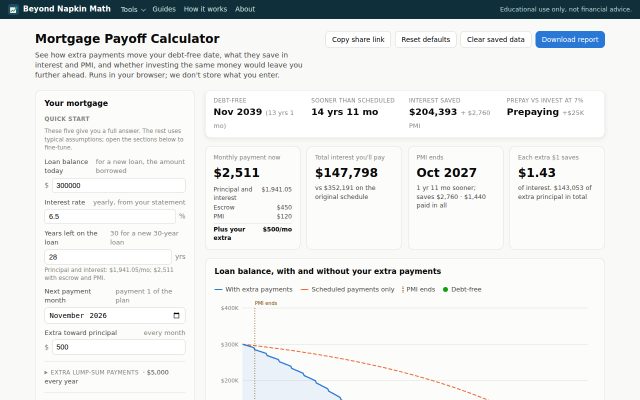 Try it
Mortgage Payoff Calculator
Extra payments, PMI and the real question: pay it down or invest?
Open the tool →
Try it
Mortgage Payoff Calculator
Extra payments, PMI and the real question: pay it down or invest?
Open the tool →